
Best Lightroom Presets for Baby Photos: Soft and Sweet Edits for Little Ones
Quick answer: The best Lightroom presets for baby photos use soft light, creamy skin tones, and gentle pastel colours that keep a little one looking natural and sweet. A good preset brightens the picture just enough to show tiny fingers and sleepy smiles, while keeping the skin smooth and the background calm. Pick one soft preset for the whole set, keep the edits very light, and let the baby’s own charm do the rest.
Why Baby Photos Need the Softest Touch
Babies change so fast that every photograph becomes a keepsake almost as soon as it is taken. The tiny hands, the wispy hair, the way a newborn curls up asleep: all of it is gone within weeks. Parents treasure these pictures for the rest of their lives, so the editing should be as gentle as the subject. A heavy edit that sharpens every detail or pushes the colours hard will feel wrong next to such a delicate little person.
Baby skin is also different from adult skin. It is softer, paler, and more sensitive to colour casts. A preset that works well for an adult portrait can make a baby look flushed or blotchy, because it was designed for stronger skin tones. Presets made for babies protect the skin, keeping it creamy and even while letting the natural pink of the cheeks show through. They also handle the fine, soft texture of baby hair with care, so it stays wispy instead of turning wiry.
What Makes a Great Baby Preset
The first quality of a great baby preset is kindness to skin. It should even out the light across the baby’s face without removing the natural texture. A small amount of softness is welcome, but the skin should still look like skin, with its tiny variations and its soft glow. Watch the cheeks especially: a good preset keeps them rosy but never red, and a quick check of the red and orange tones will usually fix any flush.
The second quality is light. Baby photos look best when they are bright but not blown out. A preset that lifts the shadows and protects the highlights will keep the blanket, the crib, and the baby’s clothes full of detail. The light should feel like a sunny window on a calm morning, wrapping the baby in warmth without any harsh spots.
The third quality is colour. Pastels suit babies beautifully: soft pinks, creams, pale blues, and gentle greens all feel right. A preset that mutes the stronger colours slightly while keeping the pastels clean will give the picture a sweet, dreamy quality. The background should stay calm too, so nothing competes with the baby’s face for attention.
- Creamy skin: even, soft skin with a gentle rosy glow and no red patches.
- Soft bright light: lifted shadows and protected highlights for a sunny, calm feel.
- Pastel colours: clean, gentle tones that suit blankets, clothes, and nursery scenes.
- Calm backgrounds: muted tones that keep every eye on the baby.
- Delicate detail: enough softness to show tiny fingers without harsh edges.
Best Preset Styles for Baby Sessions
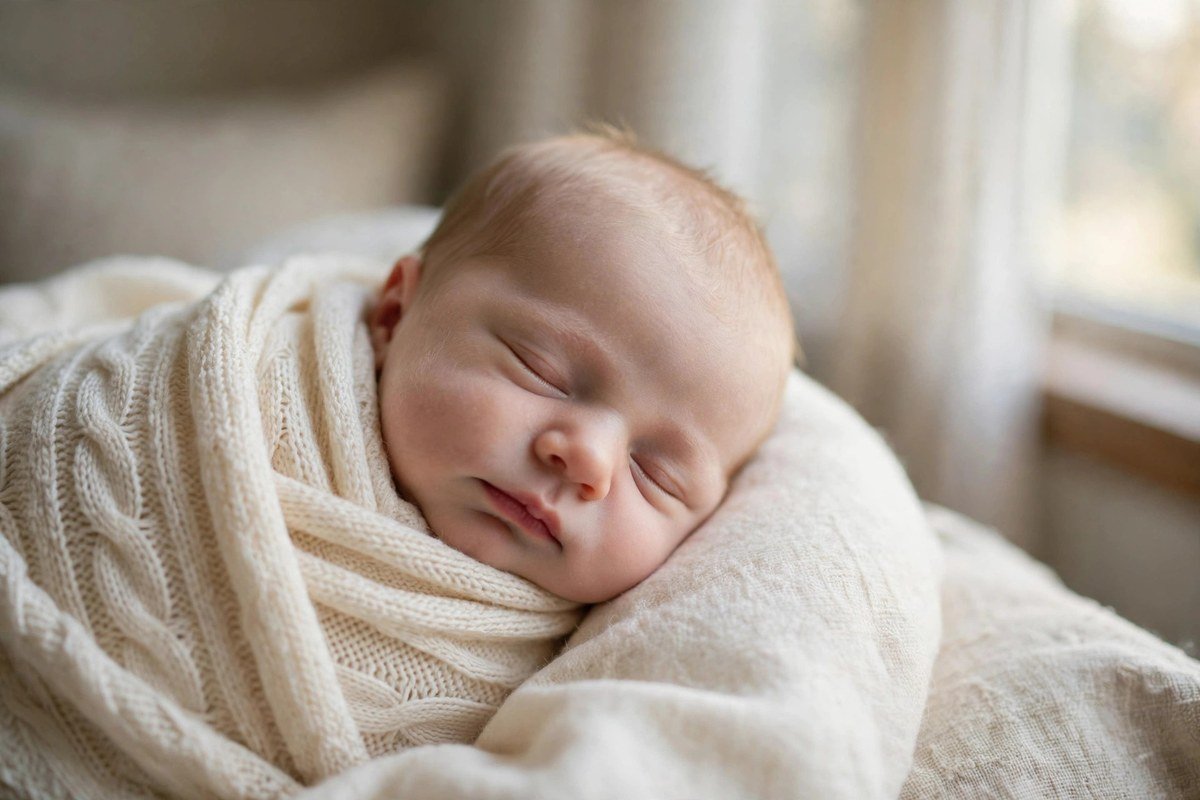
Light and airy presets are the classic choice for baby photography. They brighten the frame, soften the contrast, and give the picture a fresh, clean feeling that suits white blankets, pale nurseries, and window light. A sleeping newborn edited with a light and airy preset looks peaceful and pure, and the style works for almost every baby session.
Warm and cosy presets suit a different mood. They add a golden glow, deepen the creams and browns, and make the picture feel like a quiet afternoon at home. A baby wrapped in a knitted blanket, held by a parent on the sofa, looks wonderfully snug with this treatment. Keep the warmth gentle, because too much will make the baby’s skin look flushed.
Soft film presets bring a nostalgic feeling to baby pictures. They add a little grain, mute the colours, and soften the light in a way that recalls old family albums. Parents who want their baby photos to feel timeless often love this style, because it makes a new picture feel like a treasured memory already. It works especially well for black-and-white conversions too.
Fresh and natural presets are the most honest style of all. They change very little, simply cleaning up the light and colour so the picture looks like the real moment. This is the best choice when the baby’s natural colouring is already beautiful and you want the edit to disappear entirely. Many professional newborn photographers use this style as their everyday preset.
Editing Newborn Photos
Newborn sessions are usually held in the first two weeks, when the baby sleeps most of the time and curls up naturally. The photographer works slowly and quietly, and the editing should match that pace. Start with the exposure: the baby’s face should be bright enough to show the closed eyes and tiny lips clearly, but the highlights on the blanket should not disappear into white.
Skin needs the most care in newborn pictures. Newborns often have a little redness, some flaky patches, or a yellowish tone in the first days, and a good preset will even these out without hiding the baby’s real colouring. A small reduction in red saturation can calm a flushed cheek, while a gentle lift in warmth can soften a yellow cast. Always check the whole body, not just the face, so the skin tone stays consistent from head to toe.
Editing Older Babies: Sitting, Crawling and Laughing
Once a baby can sit up, the photographs change completely. The baby is awake, moving, and full of expression, and the editing needs to keep up. These pictures are often taken in brighter light, in the garden or the living room, and the preset should handle stronger daylight without washing the baby out. A small reduction in highlights will protect the skin on a sunny day.
Movement brings a new challenge: blur. A crawling baby or a laughing baby moves fast, and a preset cannot fix a blurry picture. What it can do is keep the colours and light consistent across a burst of shots, so the sharp ones all match. Choose the sharpest frames, apply the same preset to each, and the set will look like a single happy afternoon.
Keeping a Baby Album Consistent
A baby album tells the story of the first year, from the first sleepy days to the first birthday. If each month is edited in a different style, the album will feel scattered. The simplest way to keep it together is to choose one preset family at the start and use it for every picture, adjusting only the exposure and white balance as the baby grows and the seasons change.
Light changes with the seasons, and your preset needs to adapt. A summer picture taken in bright sun will need the highlights pulled down, while a winter picture taken by a window may need a little more brightness. These are small adjustments, and they should not change the overall feeling of the preset. The skin, the warmth, and the softness should stay the same from the first picture to the last.
Check the pictures side by side before you print or share them. Open a few months together and look for the one that stands out: a picture that is warmer, darker, or more colourful than its neighbours. A small correction will pull it back into line. The newborn Lightroom presets on this site are built to match across a whole first year, and the candid photography presets guide has useful ideas for those unposed, laughing moments that parents love most.
Common Baby Editing Mistakes to Avoid
The biggest mistake in baby editing is over-smoothing the skin. A baby’s skin is already soft, and a preset that smooths it further will make the baby look like a doll. Keep the texture real, and let the tiny details, like the wisps of hair and the creases in the hands, stay visible. Those details are what make the picture precious.
The second mistake is oversaturation. Bright, punchy colours may look fun on a phone screen, but they overwhelm a baby picture. A red blanket that glows, a blue toy that dominates the frame, or a green wall that casts colour onto the skin will all pull attention away from the baby. Muted, gentle colours always suit little ones better.
- Over-smoothing skin: the baby starts to look like a doll instead of a real child.
- Oversaturation: bright colours overwhelm the baby’s soft, delicate features.
- Adult presets: strong contrast and clarity make baby skin look harsh.
- Too much warmth: the baby’s cheeks turn red and the picture feels heavy.
- Mixed styles in one album: the story of the first year loses its flow.
Frequently Asked Questions
Which Lightroom preset is best for baby photos?
A soft, bright preset with creamy skin tones and gentle pastel colours works best for most baby pictures. It keeps the baby looking natural and sweet while making the light feel warm and calm.
How do I edit newborn skin without making it look fake?
Use a preset that evens out the light rather than erasing texture, and adjust the red tones gently to calm any flush. Small changes always look more natural than heavy retouching on a newborn.
Should baby photos be bright or warm?
Bright and softly warm is the best combination, because it feels like gentle morning light. Avoid edits that are very dark or very orange, since both can make a baby picture feel heavy.
Can I use the same preset for newborn and older baby photos?
Yes, one soft preset family can cover the whole first year if you adjust the exposure for each stage. Newborn pictures need softer light, while older babies in daylight may need the highlights pulled down a little.
Do baby presets work on phone photos too?
Yes, baby presets work well on phone photos, and many parents edit their baby pictures entirely on mobile. Shoot near a window for soft light, then apply the preset and fine-tune the brightness.
Final Thoughts
Baby photography is really about patience and tenderness: waiting for the sleepy smile, the tiny yawn, or the moment a little hand wraps around a finger. A good preset simply helps that moment shine, with soft light, creamy skin, and colours as gentle as the baby in the frame. Choose one soft style, edit with a gentle hand, and return to that same preset through the whole first year so the album tells one sweet story. Years from now, when the baby is grown, these pictures will still bring back the feeling of those early days, and a thoughtful, gentle edit will make them even more precious.




One Comment