AI Photo Prompts for Professional Headshots
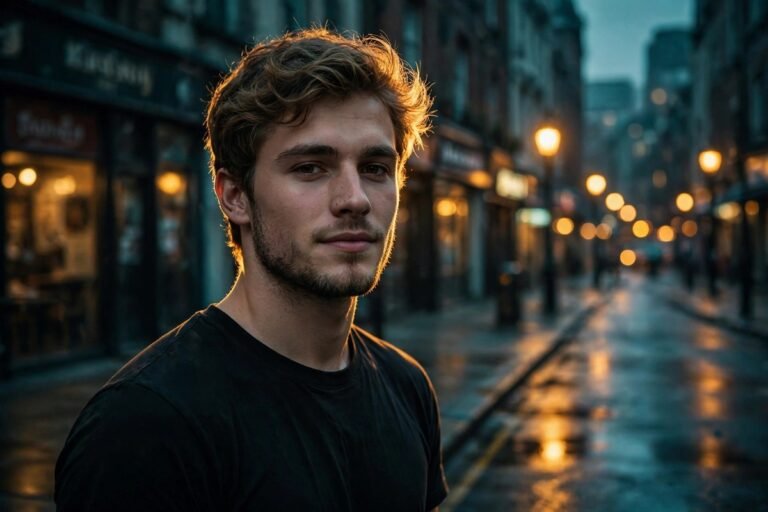
Your headshot is often the first impression you make. A recruiter sees it on LinkedIn before reading your CV, a client sees it on your website before your first call, and a conference organiser sees it before you step on stage. It needs to look like you on a good day: confident, approachable, and professional. AI photo prompts for professional headshots help you get that result without a studio, a long shoot, or hours of editing.
A prompt is simply a clear description of the photo you want. Instead of adjusting sliders one by one, you write what matters: the light, the background, the expression, and the mood. The AI then applies that description to your photo. When the prompt is specific, the result looks natural. When it is vague, the result often looks stiff or over-processed. This guide shows you how to write specific prompts, gives you ready-made examples for different jobs and platforms, and explains the small mistakes that make headshots look fake.
The Anatomy of a Good Headshot Prompt
Every strong prompt has four parts. First, the subject: who is in the photo and how they should look. Second, the light: soft, natural, bright, or warm. Third, the background: plain, office, outdoor, or blurred. Fourth, the mood: confident, friendly, serious, or creative. If you miss one part, the AI fills the gap with a guess, and guesses are where strange results come from.
Here is a simple formula you can reuse. Start with Enhance this headshot, then add the light, then the background, then the expression, then one guardrail about skin. For example: Enhance this headshot with soft natural light, a clean grey background, a warm confident smile, and natural skin texture. That one sentence covers all four parts, and it is easy to change for a different job. Swap grey for office, warm for serious, and you have a completely different photo.
Guardrails matter more in headshots than in any other kind of photo. Words such as flawless, perfect, or airbrushed often lead to skin that looks plastic. Use natural skin texture, true-to-life colour, and preserve facial features instead. Your headshot should still look like you when someone meets you in person. If a colleague would not recognise you from the photo, the edit has gone too far.
Twelve Ready-Made Prompts by Profession
Pick the prompt closest to your role, then change the background or the expression to match your workplace. Each prompt is written to be copied as it is.
Corporate and Finance
Prompt: Edit this headshot for a corporate profile with soft studio light, a clean neutral background, a confident and calm expression, and sharp focus on the eyes. Keep the suit crisp, the skin tones natural, and the overall tone polished and trustworthy.
Tech and Startups
Prompt: Enhance this headshot with bright natural light, a modern office background softly blurred, a friendly and open expression, and true-to-life colour. Keep the look relaxed but professional, with natural skin texture preserved.
Healthcare and Education
Prompt: Refine this headshot with gentle, even light, a plain light background, and a warm, approachable smile. Keep the image clean and reassuring, with soft contrast and natural colour throughout.
Creative and Media
Prompt: Edit this headshot for a creative portfolio with warm directional light, a softly blurred studio background, and a confident, expressive look. Keep the colours rich but natural, and preserve the personality in the expression.
Law and Consulting
Prompt: Enhance this headshot with balanced studio lighting, a dark neutral background, and a serious, trustworthy expression. Keep the focus sharp, the contrast gentle, and the tone formal without looking stiff.
Sales and Customer-Facing Roles
Prompt: Edit this headshot with bright, welcoming light, a clean light background, and a genuine smile. Keep the energy friendly and confident, with natural skin tones and a sharp, clear image.
Founders and Speakers
Prompt: Transform this headshot into a strong speaker portrait with dramatic but soft light, a dark blurred background, and a confident, engaging expression. Keep the face sharp and the mood bold yet approachable.
Remote Workers
Prompt: Enhance this headshot with soft window light, a tidy home-office background blurred, and a relaxed, friendly expression. Keep the colours natural and the image bright, clean, and professional.
Actors and Performers
Prompt: Edit this headshot with soft, even light, a plain background, and a natural, expressive look. Preserve every facial detail, keep the skin texture real, and avoid any smoothing that changes how the person looks.
Real Estate Agents
Prompt: Refine this headshot with warm natural light, a bright blurred background, and a confident, welcoming smile. Keep the image fresh and approachable, with clear focus and true-to-life colour.
Students and Graduates
Prompt: Edit this headshot for a first job application with clean, bright light, a plain neutral background, and a friendly, confident expression. Keep the look simple, honest, and professional.
Executives
Prompt: Enhance this executive headshot with refined studio light, a dark elegant background, and a calm, authoritative expression. Keep the suit sharp, the skin natural, and the contrast soft and sophisticated.
Choosing Light and Background
Light decides the mood before anything else. Soft window light is the safest choice for most people. It flatters skin, softens shadows, and looks natural on every platform. Studio light is stronger and more formal, which suits corporate and executive photos. Warm golden light works well for creative roles, but it can look too casual for finance or law. If you are unsure, start with soft natural light and change it only if the result feels wrong for your role.
Backgrounds should be simple. A plain grey, white, or dark background never distracts from your face, and it crops well on LinkedIn, a company website, and a conference programme. An office background can add context, but it must be blurred, or it will compete with you for attention. Outdoor backgrounds work for creative and outdoor professions, yet they need the same rule: you in focus, everything else soft. A busy background is the fastest way to make a good headshot look like a holiday photo.
Colour also plays a role. Neutral backgrounds suit almost everyone. Dark backgrounds add authority and work well for senior roles. Light backgrounds feel open and friendly, which suits sales, teaching, and healthcare. Match the background to the impression you want to give, not to your favourite colour. The photo is about trust, and trust comes from clarity.
LinkedIn, Websites, and Print: One Photo, Three Uses
Most people need the same headshot in three places, and each place has different needs. LinkedIn crops tightly, so your face should fill more of the frame, and the background should be plain enough to survive a small square crop. A company website often shows the photo larger, so sharpness and natural skin matter more there. Print, such as a conference badge or a book jacket, needs the highest resolution and the most careful colour, because print shows every flaw a screen hides.
Write your prompt with the main use in mind, then create a second version for the other uses. For LinkedIn, add the words tight crop, face clearly visible, plain background. For a website, add sharp focus, natural colour, clean and professional. For print, add high detail, accurate colour, and gentle contrast. Small changes like these stop you from using a photo that looks fine on a phone but weak on a larger screen.
If you need a LinkedIn-specific starting point, our guide to AI photo prompts for a LinkedIn profile covers crops, backgrounds, and expressions for that platform in more detail. Use it alongside the prompts here to build a set that works everywhere you appear online.
Checklist Before You Publish
Run through this list before you upload a new headshot anywhere. It takes two minutes and catches the errors that are hard to see after staring at the same photo for an hour.
- Does the photo still look like you in person? Ask a friend if you are unsure.
- Are both eyes sharp and clearly visible? Eyes carry the whole impression.
- Is the skin texture natural, with no waxy or plastic look?
- Is the background plain, clean, and free of distractions?
- Is the crop tight enough for LinkedIn and loose enough for a website?
- Does the expression match the role: warm for friendly jobs, calm for formal ones?
- Is the lighting even, with no harsh shadow across half the face?
- Would you trust this person from the photo alone? If not, change the prompt.
Five Mistakes That Make Headshots Look Fake
The first mistake is over-smoothing skin. It removes pores, lines, and texture, and the result looks like a drawing, not a person. Always include preserve natural skin texture in your prompt, and check the result at full size, not as a small thumbnail.
The second mistake is changing your face shape. Prompts that ask for slimmer, younger, or more symmetrical faces often distort the jaw or the eyes. Never ask the AI to change your features. Ask it to improve light and colour only.
The third mistake is a background that is too perfect. A pure white background with no shadow can look like a passport photo. A very dark background with no detail can look like a mugshot. Add the words soft shadow or gentle background detail to keep the photo feeling real.
The fourth mistake is the wrong expression for the job. A big laugh suits a creative portfolio, but it can look unserious for a law firm. A serious stare suits an executive, but it can look cold for a teacher. Match the expression in the prompt to the audience who will see it.
The fifth mistake is using one headshot for five years. Hair, glasses, and style change, and a photo that no longer looks like you breaks trust when people meet you. Update your headshot every year or two, and keep the prompt that worked so the new version matches the old one in style.
Your Next Step
Start with one photo and one prompt from this guide. Apply it, compare the before and after side by side, and change one word at a time until the result feels right. Save the prompt that works, note the light and background you used, and reuse it next time. A good headshot is not about looking perfect. It is about looking like yourself, clearly and confidently, in the place where people first meet you. For a lighter, more personal version of the same ideas, see our AI photo prompts for birthdays, which show how the same prompt structure works for casual portraits too.