
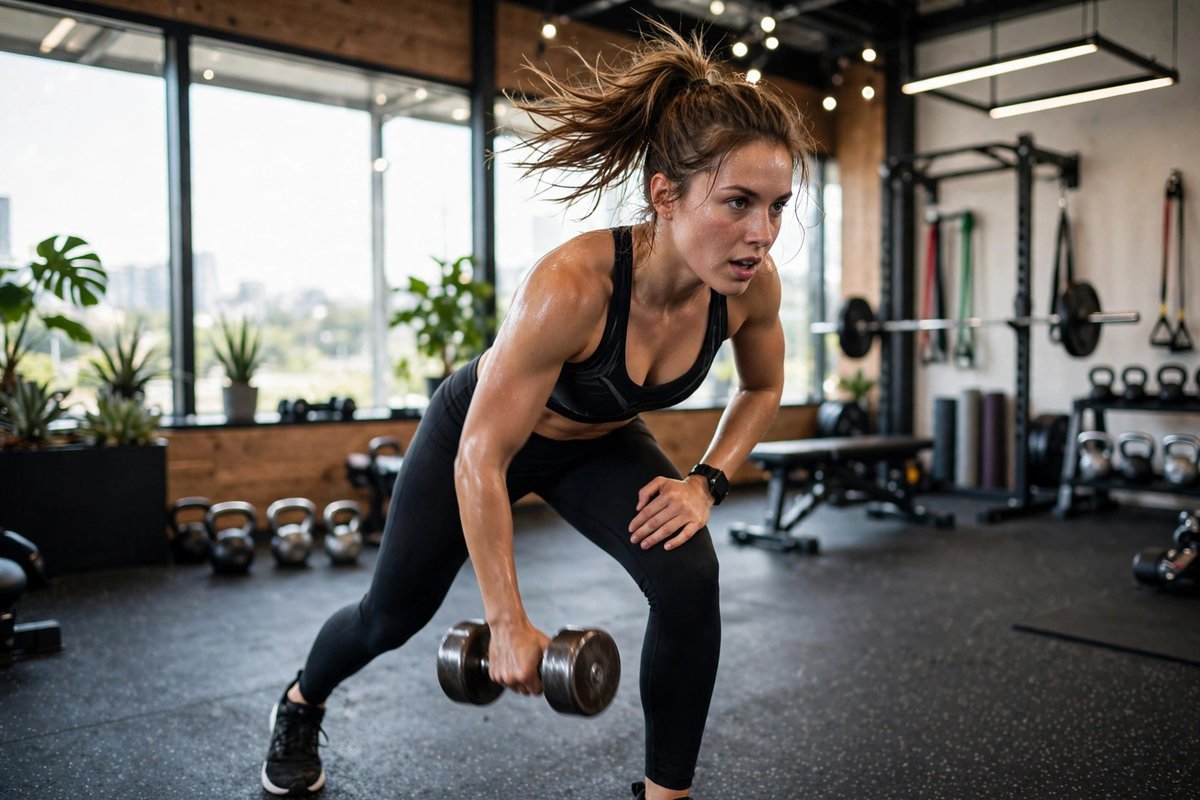
AI Video Editing Prompts for Fitness Videos: High-Energy Cuts for Workouts That Motivate
Quick answer: The best AI video editing prompts for fitness videos ask for fast, beat-matched cuts, punchy captions, and smooth transitions that match the energy of the workout. A good prompt names the exercise, the mood, the clip length, and the platform so the edit comes back tight instead of messy. Start with a strong hook in the first two seconds, keep every rep visible, and let the music drive the pace.
What Makes a Fitness Video Feel Energetic
A fitness video works when the viewer feels the workout before they think about it. The camera should move with the athlete, the cuts should land on the beat, and the effort on screen should look real. When a squat, a sprint, or a heavy lift fills the frame, the viewer should almost feel the strain in their own body. That physical feeling is what makes someone stop scrolling, watch to the end, and save the clip for their next session.
Energy in a fitness edit comes from rhythm more than from speed alone. A video cut too fast becomes confusing, while a video cut too slowly feels flat. The trick is to match the pace of the edit to the pace of the exercise: quick cuts for a high-intensity circuit, longer holds for a slow strength lift, and a pause on the face at the hardest moment. When the edit breathes with the workout, the whole video feels alive instead of assembled.
How AI Prompting Works for Workout Edits
Think of the prompt as a briefing you hand the editor before it touches a frame. You spell out what was filmed, what energy the session carried, and what the finished reel must deliver, and the software cuts from that brief. Precise briefs yield precise edits; fuzzy wording yields a fuzzy montage. Naming the lift, the run time, and the vibe gives the tool something solid to aim at.
A strong fitness prompt has four parts. First, it names the workout and the key moments to keep, such as the warm-up, the heaviest set, and the final stretch. Second, it sets the pace, for example fast cuts on the beat for a circuit or steady cuts for a strength session. Third, it describes the look, such as bold captions, warm tones, or a clean gym background. Finally, it pins down where the clip will live and how long it should run, since a vertical reel demands a different shape than a full training session.
Prompts for Warm-Ups and Training Montages
Warm-up footage is easy to rush past, but it sets the tone for everything that follows. A good prompt asks the editor to keep the warm-up short and lively, with quick cuts between stretches and light movement, and a caption that tells viewers what the session will cover. This gives the video a clear beginning and helps new viewers understand the workout before the hard part starts.
Training montages are where AI prompting shines. Try a prompt like this: “Cut this 12-minute gym session into a 45-second montage. Keep the heaviest lift of each exercise, cut on the beat of the music, add bold captions naming each move, and finish with a slow-motion clip of the final rep.” That style of wording succeeds because it spells out the keepers, the trims, and the mood the final cut should carry.
For a full workout recap, ask for a clear structure instead of a random highlight reel. A prompt might read: “Turn this workout into a 90-second recap in three parts: warm-up, main lifts, and cool-down. Use a caption for each part, keep the rest between sets short, and end with the total time and the number of sets.”
Prompts for Short Reels and Challenge Clips
Short fitness reels live or die in the first two seconds, so the prompt should put the hook first. Ask the editor to open with the most impressive moment, such as a heavy deadlift or a clean muscle-up, then rewind to show how the set began. This kind of opening creates curiosity, and curiosity keeps people watching through the rest of the clip.
Challenge videos need a different shape. A prompt for a 30-day challenge update might say: “Edit these clips into a 30-second progress video. Show day one and day thirty side by side, add a simple caption with the numbers, and keep the music steady and upbeat.” The side-by-side numbers carry the story, so hold back on fancy moves and give the transformation room to land. The fitness reels prompts on this site cover more short-form ideas in the same style.
Prompts for Coaching and Form Breakdowns
Coaching videos are about clarity, not speed. When you explain a squat or a press, the viewer needs time to see the feet, the hips, and the bar path. A good prompt slows the edit down: “Cut this coaching clip so each step of the squat gets its own caption and a two-second hold. Zoom in on the feet during the setup, then show the full lift at normal speed.” Slow, deliberate cuts make the teaching land.
Form breakdowns benefit from repetition. Ask the tool to show the same rep twice, once at full speed and once slowed down, with a caption pointing out the one thing to fix. This is far more useful than a long talking segment, because the viewer can see the mistake and the correction in the same few seconds. Keep the captions short and direct, naming one fault at a time so the viewer is never overloaded.
Matching Music, Captions, and Pace to the Workout
Music is the heartbeat of a fitness edit. A fast track suits a circuit or a sprint session, while a steadier track suits a heavy strength day. Your prompt should name the mood of the music, not just ask for any background track. Words like driving, upbeat, or calm and steady give the tool a much better guide than simply saying add music.
Captions do the quiet work in a fitness video. Many people watch without sound, so the captions carry the message: the name of the exercise, the number of reps, and the one tip that matters. Keep each caption under six words where you can, and place it where it never covers the athlete’s face or the moving weight. A prompt that sets these rules will produce captions that help rather than distract.
Rhythm trips up newcomers more than any other choice. Slicing every second at top speed feels exciting in theory, yet a training clip gains its punch from variety: brisk cuts while the athlete strains, then a held shot as the set ends. Ask for the lens to linger on the lifter’s expression for a heartbeat after a gruelling rep — that brief stillness is what sells the strain as genuine. The YouTube video prompts guide has useful ideas for longer training videos where pacing matters even more.
Prompts for Before-and-After and Progress Videos
Progress videos are some of the most shared fitness content, because they show change that words cannot. A strong prompt keeps the comparison honest and simple: same angle, same lighting, and a clean side-by-side layout. Ask the editor to add only the dates and the key numbers, and to leave out flashy effects that would distract from the result.
The order of the clips matters as much as the clips themselves. Start with the earliest footage, move through the middle stages quickly, and finish on the latest clip held a little longer. This shape gives the viewer a sense of a journey, and the longer final hold lets the result sink in.
Mistakes That Drain the Energy Out of a Fitness Edit
The most common mistake is cutting out the struggle. When every clip shows a perfect rep, the video feels fake, and viewers stop trusting it. Keep one or two moments where the lift is hard, the breathing is heavy, or the last rep is slow.
Another mistake is letting effects take over. Flashy transitions, spinning text, and constant zooms pull attention away from the workout itself. One clean transition style used throughout the video will look far more professional than five different effects competing with each other. The same rule applies to colour: a consistent warm or natural grade across the whole clip beats a new filter on every shot.
- Cutting the struggle: perfect-only clips feel fake and viewers stop trusting the video.
- Too many effects: flashy transitions distract from the workout instead of supporting it.
- Weak opening: a slow first two seconds loses viewers before the workout even starts.
- Captions covering the action: text over the athlete’s face or the moving weight hides the key moment.
- Music fighting the pace: a slow track under a fast circuit makes the whole edit feel tired.
- Uneven colour: a different grade on every shot makes the video look patched together.
Frequently Asked Questions
What details make a fitness editing prompt actually useful?
Lead with the workout, the energy you want, and where the clip will run, plus its length. Then flag the moments to keep — the heaviest set, the hook — and the dead time to drop. Concrete anchors like that steer the edit far better than broad adjectives.
How long should a fitness reel edited with AI be?
A snappy reel usually lands best at roughly half a minute to a minute — enough room for one complete set without losing the scroller. Full sessions can stretch over several minutes, provided the rhythm keeps shifting.
Can AI editing handle slow-motion lifts?
Yes — point to the single rep you want stretched out, and say so plainly in the brief. Saving the slowdown for that one hardest lift keeps it striking; slowing everything makes the clip crawl.
Do I need to mention music in my fitness editing prompt?
It helps a lot, because the music sets the pace of the cuts. Name the mood you want, such as driving or upbeat, so the edit and the track pull in the same direction.
How do I keep captions readable in a fast workout video?
Short words win: cap every line at a handful of words, pick a plain bold typeface, and sit the text clear of faces and barbells. Brief lines stay legible even when the cutting races.
Final Thoughts
Honour the session and the edit follows: the strain, the rhythm, the faces at the edge of effort. Draft that brief first, shape the cuts around it, and the reel will carry the same charge as the workout did.



One Comment