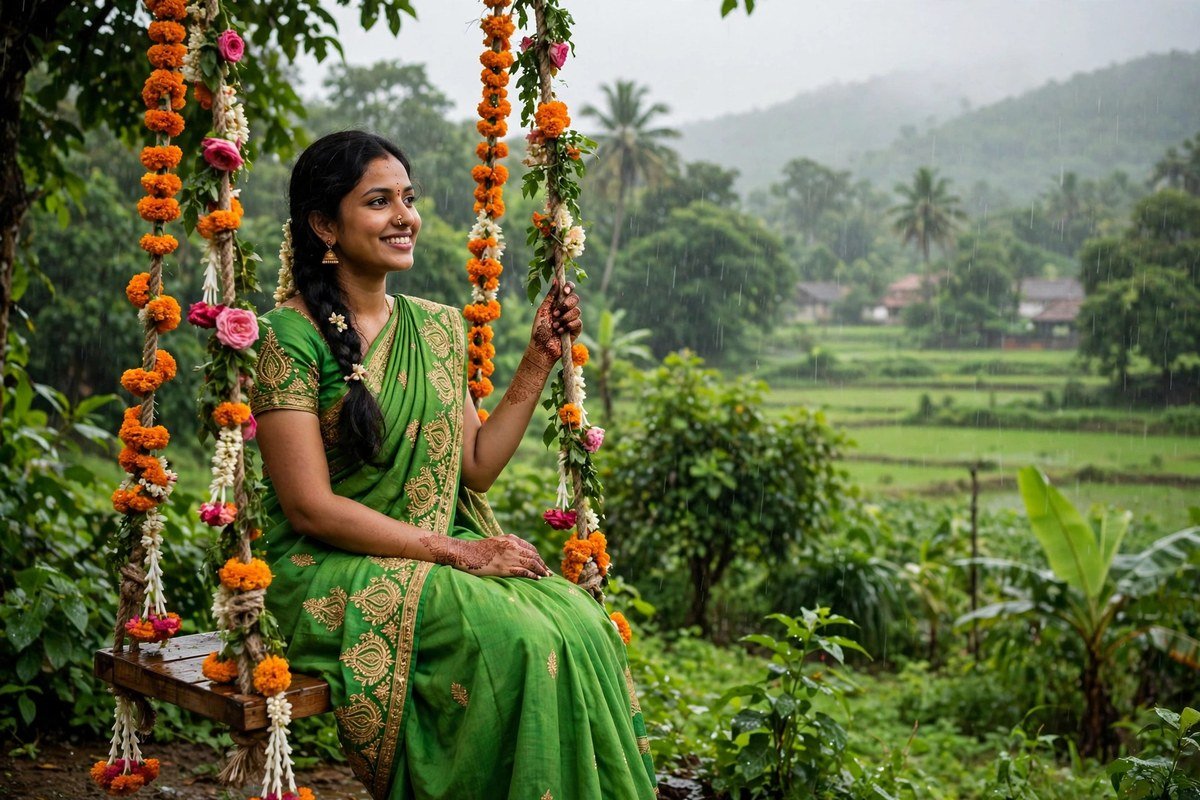
Hariyali Teej AI Photo Prompts — Green Saree, Mehndi and Monsoon Magic
There is no festival in India that photographs quite like Hariyali Teej. Everything about it is colour — the green of the saree, the deep red of the mehndi, the gold of the bangles, and the fresh green of the monsoon outside the window. These hariyali teej ai photo prompts are written for women who want their Teej photos to look as beautiful as the festival feels, whether the photo is a solo portrait, a mehndi close-up, or a swing photo with friends.
Hariyali Teej, celebrated by married women in North India during the monsoon month of Shravan, honours the union of Shiva and Parvati, and women dress in green, apply mehndi, and swing on decorated jhulas. That gives you four ready-made photo themes in a single festival — green, mehndi, swings, and rain — and this guide has a prompt set for each one. Every prompt below is written to keep your face unchanged and your photos looking real, not like a painting.
What Makes a Great Hariyali Teej Photo
A good Teej photo is built from three things: the green, the mehndi, and the light. The green of the saree should look rich and deep, not flat or yellow. The mehndi should be sharp enough that the pattern reads clearly. And the light should be soft — monsoon light, window light, or evening light — because harsh midday sun washes out both the green and the mehndi in the same shot.
When you write a prompt for a Teej photo, name all three. Say the saree is “bright green with gold embroidery”, say the mehndi is “deep red-brown, intricate”, and say the light is “soft monsoon light”. The AI cannot guess what your festival looks like — you have to tell it, one detail at a time. That is the whole secret of good AI photo prompts, and it matters more for Teej than for almost any other festival, because the festival’s beauty is in its details.
Hariyali Teej AI Photo Prompts — Green Saree Portraits
The green saree portrait is the signature Teej photo. These prompts are built for solo portraits, and they protect the two things that matter most: your face and the saree’s colour.
“Turn this portrait into a beautiful Hariyali Teej photo: the woman wearing a bright green saree with gold embroidery and a matching blouse, gold bangles and earrings, soft monsoon light, green foliage softly blurred behind, joyful and graceful mood, photorealistic, keep the face exactly the same.”
This is the prompt to start with. It works with almost any portrait photo, and the blurred green background makes the saree stand out without competing with it. If your original photo was taken indoors, the AI will rebuild the background as greenery — check that the edges of your hair and saree still look clean after the edit.
“Create an elegant Teej portrait: woman in a deep green silk saree with a golden border, hair in a braid with fresh flowers, delicate gold jewellery, warm evening light, traditional courtyard with marigold decorations behind, serene and festive mood, photorealistic, do not change facial features.”
This version leans traditional — silk, a braid with flowers, a courtyard — and it suits photos taken at home or at a family function. The marigold in the background adds a warm orange that balances the green beautifully, so the photo never feels like one flat colour.
Hariyali Teej AI Photo Prompts — Mehndi Hands
Mehndi photos are close-ups, and close-ups are where AI edits most often go wrong — usually with the fingers. These prompts are written to protect the hands.
“Enhance this mehndi photo: hands with deep red-brown intricate henna designs, gold bangles on the wrists, green saree fabric softly visible at the edges, soft natural light, sharp details on the henna patterns, festive and elegant mood, photorealistic.”
The key phrase here is “sharp details on the henna patterns”. Without it, the AI often softens the mehndi into a brown blur. If your first result still blurs the pattern, add “crisp henna lines, clear paisley and floral motifs” and run it again.
“Turn this photo into a Teej mehndi close-up: two hands together showing fresh dark mehndi, a small green bangle set, marigold flowers beside the hands, soft window light, rich colours, sharp focus on the henna, photorealistic.”
Two hands together is the classic Teej mehndi shot, and it works because the composition is naturally balanced. The marigold beside the hands gives the AI a second colour to work with, so the photo feels like a festival still life rather than a flat product shot.
Jhula Swing Prompts
The swing — the jhula — is the most joyful Teej photo, and also the hardest, because it has movement, flowers, and a person all in one frame.
“Transform this photo into a Hariyali Teej swing scene: the woman in a green saree sitting on a swing decorated with marigold flowers and green leaves, gently swaying, monsoon greenery all around, soft daylight, happy and carefree mood, photorealistic, keep the face the same.”
Ask for “gently swaying” rather than a big swing motion — the AI handles gentle movement far better than dramatic motion, and the photo stays sharp. If you are starting from a photo taken on a real swing, the AI only needs to enhance the flowers and the greenery, which it does well.
“Create a dreamy Teej swing photo: woman in a bright green lehenga on a flower-covered swing, green leaves and soft rain in the background, golden evening light breaking through clouds, joyful and romantic mood, cinematic, photorealistic.”
This is the most cinematic prompt in the guide, and it is the one to use for a profile picture or a festival post that needs to stand out. The rain in the background is a small detail that changes the whole mood — it turns a nice photo into a monsoon photo.
Monsoon Rain and Group Photo Prompts
Teej falls in the monsoon, so rain is part of the festival — and rain photos, done well, are the most atmospheric of the set.
“Turn this photo into a monsoon Teej scene: the woman in a green saree standing in light rain, raindrops visible, wet green leaves around, soft grey-blue sky, fresh and joyful mood, photorealistic, keep the face unchanged.”
Light rain is the right ask — heavy rain makes the AI blur the whole photo. If you want the rain more visible, add “raindrops on the leaves and saree” rather than asking for a downpour.
“Enhance this group Teej photo: four women in green sarees with mehndi and gold jewellery, sitting together with a decorated swing behind, laughing naturally, soft monsoon light, vibrant greens and golds, warm and festive mood, photorealistic.”
Group photos need one thing above all: natural expressions. AI editors love to “fix” smiles into identical grins, so this prompt says “laughing naturally” — and if a face still changes, add “keep every face exactly as in the original” before you run it again.
The Teej Colour Palette — Getting the Greens Right
Green is a difficult colour for AI editors. Too little and the saree looks grey; too much and the whole photo turns into a green wash. The fix is to name two greens in your prompt: the saree’s green and the background’s green. Say “bright green saree” and “soft green foliage” in the same prompt, and the AI will keep them separate. Adding one warm colour — gold jewellery, marigold flowers, or warm evening light — stops the photo from feeling cold.
One more palette tip: get the saree and the mehndi into the same frame whenever you can. Green and the red-brown of mehndi sit opposite each other on the colour wheel, which is why a photo with both in it looks balanced without any editing at all. If your photo has only one of them, add the other — a green bangle beside mehndi hands, or a marigold beside a green saree — and the photo will feel complete.
After the AI edit, a gentle preset can finish the job. The best Lightroom presets for aesthetic photos on this site include warm, soft options that suit Teej’s green-and-gold palette without pushing the greens too far. And if you are also making a reel from the same day, our Karwa Chauth template guide covers the same festive-editing ideas in video form.
Tips for Realistic Results
- Start from a good base photo. A sharp, well-lit photo edits beautifully. A blurry or dark photo will not be saved by any prompt — fix the light first, then prompt.
- Always protect the face. Include “keep the face exactly the same” in every prompt, and zoom in to check the eyes and smile before posting.
- Check the hands. AI struggles with fingers. Zoom in on every hand in the photo — extra fingers and bent thumbs are the most common giveaway.
- Do not overdo the flowers. One or two floral details are enough. Asking for flowers everywhere turns the photo into a garden instead of a portrait.
- Keep the mehndi dark. Fresh mehndi is deep red-brown, not orange. Say “deep red-brown henna” in your prompt, never just “henna”.
Frequently Asked Questions
Which AI editor works best for Teej photos?
You can run them in any editor that accepts text prompts — Gemini, ChatGPT’s image tools, and most photo apps all manage them. Teej edits lean on colour and light, and those are the two things every big tool handles well.
Can I use these prompts on old Teej photos?
Yes. Open the old photo, add “restore natural colours, remove fading” to the matching prompt, and check the faces closely — older photos need a gentler touch so they still look like the original day.
Why does my green saree look dull after editing?
The AI may be balancing the whole photo toward neutral colours. Add “rich, vivid green saree” to your prompt and name a warm accent — gold jewellery or marigold — so the green has something to stand against.
Can I use these prompts for Karwa Chauth too?
Mostly, yes — the mehndi and portrait prompts transfer well. Swap “green saree” for a red one and “monsoon” for “evening”, and the prompts fit Karwa Chauth with almost no other changes.
Hariyali Teej is a festival of green, and your photos should be too — rich green sarees, dark mehndi, gold bangles, and soft monsoon light. Use the prompts above, protect your face and your hands, and let the festival’s own colours do the work. Happy Teej — and may your photos be as green as the season.